Paths for professional and personal goals
Plan career, health, travel or finances side by side. Every path gets a colour, a main goal and a deadline; your own categories are possible.

Vision board app
Collect pictures of your goals on a digital vision board – and connect them with paths, milestones and steps. That way your vision does not stay a pretty collage but becomes reality, day by day.
Free to start · no credit card needed
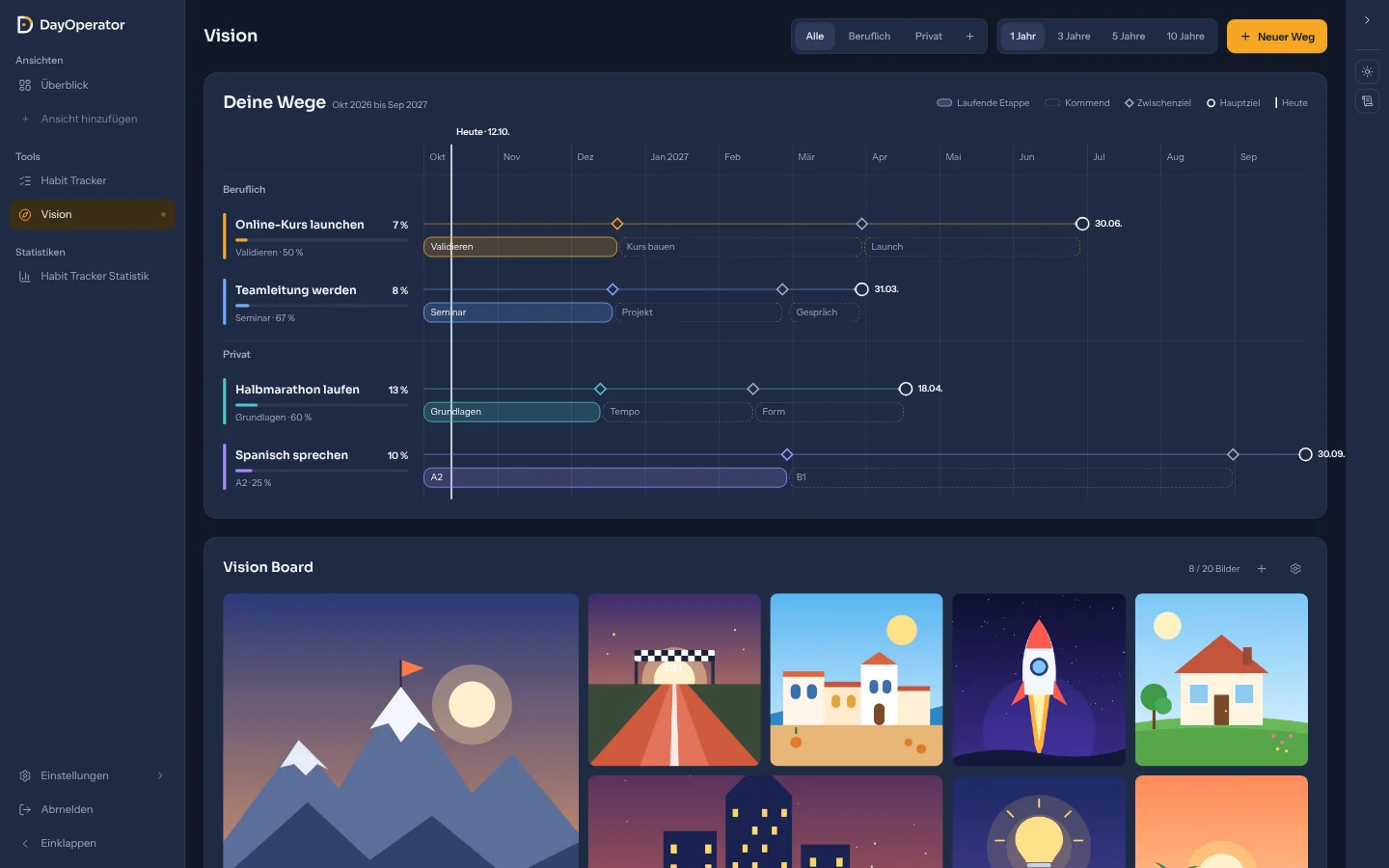
A vision board is a collage of pictures that show what you are working towards – the home of your own, the half marathon, the trip to Japan. A vision board app brings that idea to your phone and computer: you upload pictures, arrange them and always have your goals at hand – without scissors, glue and pinboard.
Having the picture in front of you helps you stay on course: if you see every day what you are doing something for, it is easier to make the right decision in everyday life. To turn inspiration into progress you need more than pretty pictures, though – you need a plan.
That is exactly what sets the DayOperator vision board app apart: the vision board is part of the Vision tool, where you plan professional and personal paths with a main goal, milestones and concrete steps. Pictures, timeline and daily habits work together.
Your own digital vision board in four steps:
Upload photos that show your goals – up to 20 pictures in JPEG, PNG, WebP or GIF format, each up to 4 MB.
Arrange the pictures by drag & drop and give important goals more room: one cell, two cells or four cells.
One click opens the picture large – ideal for a quiet moment in the morning.
Create a path for your most important picture – with main goal, deadline, milestones and steps. That is how a wish becomes a plan.
The vision board is your starting point, the Vision tool is your plan. Here is what is inside:
Plan career, health, travel or finances side by side. Every path gets a colour, a main goal and a deadline; your own categories are possible.
Split big goals into stages with concrete steps. Stages may overlap and then run in parallel.
All paths, stages and deadlines next to each other: you see at once what is running, what comes next and where it gets tight.
Tick off steps and the progress grows automatically. At milestones (50%, 70% and deadline reached) you can be reminded by notification.
Store sentences that strengthen you and read them every morning. Filter them with tags; if you like, they appear as a tile in your daily overview.
You reach big goals through small daily actions. Create the habits that bring you closer to your path in the habit tracker – each with its own campfire.
A good vision board is more than pretty. These five steps turn it into a tool that really moves you forward:
Think about which areas of life matter to you: career, health, relationships, finances, experiences. Pick one goal per area that excites you.
Pick motifs that stir something in you – not the perfect stock-photo scene. Your own photos often work better than glossy images.
Fewer pictures have more impact. Give your most important goals more room – in the app via the picture size.
A vision board alone is not a plan yet. For every picture, ask: what is the next small step? Enter it as a stage in the Vision tool.
Take a quick look at the board in the morning and review it once a quarter. Goals change – your board is allowed to grow with them.
The Vision tool with vision board, paths, timeline and affirmations is part of the Free plan and can be used for free – no credit card needed. A Pro plan with additional features is planned for later.
Up to 20 pictures (JPEG, PNG, WebP or GIF, each up to 4 MB). You can replace them, rearrange them and change their size at any time.
Yes. DayOperator runs in the browser and can be installed as a web app on the home screen of iPhone and Android or in the Dock on a Mac. Your vision board is the same on all devices.
Yes. Your vision board is only visible in your account. Nothing is shared unless you invite people to a Task Force – and even there only shared habits are visible.
The vision board shows what you are doing something for – it motivates. The goal plan shows how you get there – with main goal, stages, deadlines and steps. In DayOperator you get both in one tool, including progress in percent.
No. New accounts start with sample data and a short tour through all areas. When you are ready, you clear the samples with one click and enter your own goals.
Start your vision board app today
Create your free account in under a minute, upload your first pictures and turn your vision into a plan.